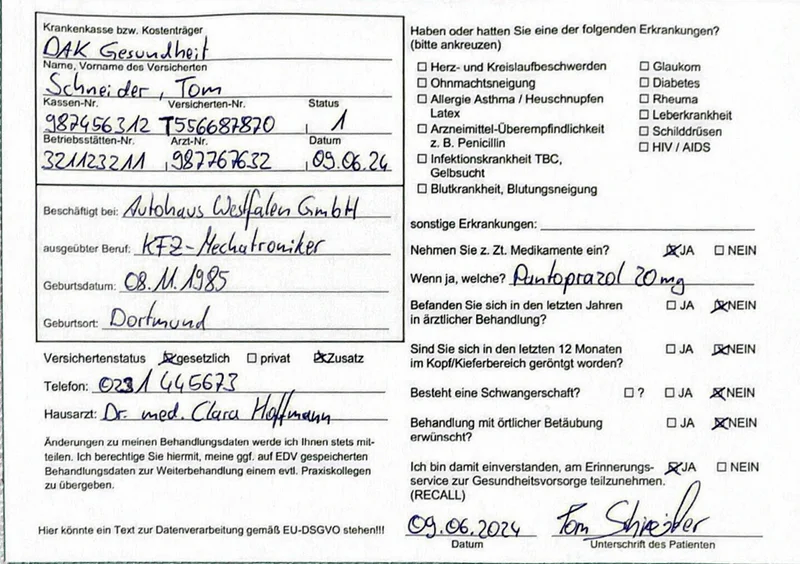
When businesses first think about form digitization, they often imagine a simple solution: software scans the document, reads the fields, done. What sounds plausible in theory fails in practice for one single reason – human handwriting.
The problem with pure OCR software
Standard OCR tools like Tesseract, ABBYY or Adobe Acrobat are optimised for printed text. With handwritten forms they quickly hit their limits: a five that looks like a six. A crossed-out field with a correction beside it. Ink bleeding through from the back of the page. For these cases, classic OCR has no robust answer.
Typical error rate of pure OCR on handwritten business forms: 10–20%. That sounds small – but on 50,000 forms it equals up to one million incorrectly captured fields.
Why 95% is not good enough
The error rate is not an abstract statistic. A form with 50 fields at 95% accuracy contains on average 2–3 incorrect entries. Scaled to 10,000 forms, that's 200,000–300,000 wrong data points entering your databases, CRM or ERP systems. They're hard to find there – and even harder to correct without being able to trace them back to their source.
For sensitive documents – insurance applications, patient questionnaires, legal declarations – a single error in the wrong field can have serious consequences.
The hybrid approach: AI + Human
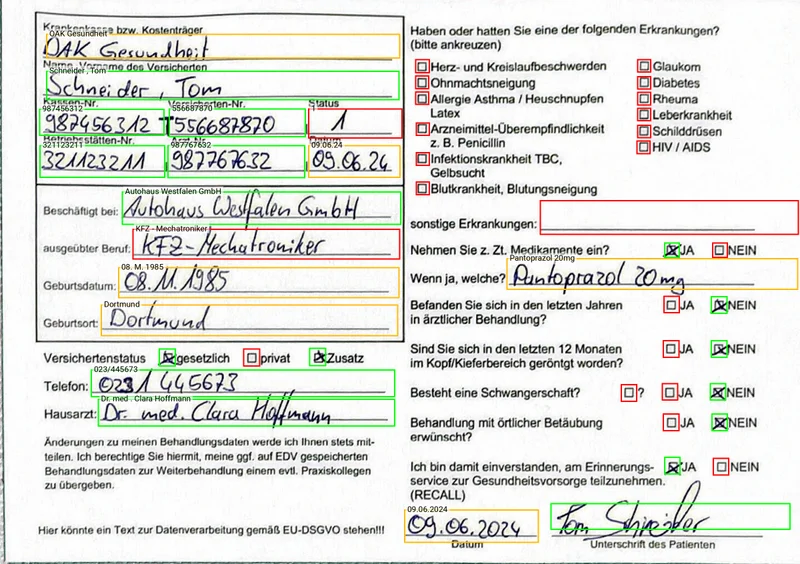
formalogix works in two stages. First, a trained AI analyses each field and simultaneously rates its own confidence: how certain is it that it read the right thing? High-confidence fields go straight through. Everything below that threshold – every uncertain word, every ambiguous number – goes to a trained human reviewer in the second step.
- 1 AI first pass with confidence score per field
- 2 Automatic flagging of all uncertain fields
- 3 Human verification of flagged fields by our team
- 4 Quality control of the full output before delivery
The result, measured over 1,000 forms: 99.8% field accuracy after verification – as accurate as manual entry, usually more accurate. Not a contractual guarantee, but a measurement you can recheck in the delivered file.
Accuracy by document type
Not all documents are equally challenging to process. The table below shows how standard OCR and formalogix compare across different document types:
| Document type | Standard OCR | formalogix |
|---|---|---|
| Machine text, structured | 95–99% | 99.9% |
| Machine text, scanned (older) | 85–95% | 99.5% |
| Handwriting, clear | 70–85% | 99.8% |
| Handwriting, hard to read | 40–60% | 99.5% |
| Mixed (print + handwriting) | 75–88% | 99.8% |
Recognition rate on handwritten forms
The complete processing pipeline
What exactly happens once a form arrives? The steps below walk through the complete journey from intake to structured output file:
Intake & pre-processing
Documents are scanned or received digitally. Image processing automatically corrects alignment, contrast and distortion.
AI first pass
The model extracts all fields and assigns a confidence score of 0–100% per field. Fields above the threshold are accepted automatically.
Flagging & verification
All fields below the threshold are automatically flagged and assigned to our verification team. Review is carried out without access to unnecessary data (data minimisation).
Quality control & delivery
A final quality check verifies completeness and consistency. Structured data is delivered in your preferred format (CSV, JSON, XML, API).
How the confidence score works
The confidence score is the heart of our system. For each field, the AI calculates a value between 0 and 100% expressing how certain it is about its own reading. The threshold – above which a field is accepted automatically – is not set universally; it is calibrated for each customer and each form type. A field containing integers (e.g. postcodes) has a different tolerance boundary than a free-text name field.
Why the threshold matters: setting it too high sends more fields to human review, slowing the process and raising costs. Too low, and uncertain fields are accepted automatically, reducing accuracy. We continuously optimise this value based on quality-control feedback.
What this looks like in a real project
In a large project for an Austrian building insurance company, we processed 103,000 handwritten insurance applications. The AI captured around 80% of all fields directly with high confidence. The remaining 20% – corrections, illegible handwriting, overwritten fields – were reviewed by our verification team. Four weeks later, the client had a clean, structured database.
When is pure AI sufficient?
For machine-printed, strictly structured forms with clearly defined fields, pure OCR can work – e.g. standardised tax forms or customs documents. But as soon as handwriting, variable layouts or older documents are involved, the hybrid approach is the only reliable option for production-critical data.
Next step
Have specific forms to digitize?
Send us a sample – we'll have a quote ready within 24 hours.